
The Raspberry Pi 3 Model B offers a solid balance of performance and versatility, making it suitable for a wide range of projects. With a 1.2GHz quad-core ARM Cortex-A53 processor, it delivers significantly better performance than its predecessors. The 1GB of RAM allows for smooth multitasking, which is important for various applications, from home automation to media centers.
The board also features integrated Wi-Fi and Bluetooth, offering seamless connectivity for wireless applications. The 40 GPIO pins provide plenty of opportunities for interfacing with sensors, motors, and other devices. If you’re building a DIY project, the Raspberry Pi 3 Model B can serve as an excellent starting point due to its adaptability and ease of use.
In terms of video output, the Raspberry Pi 3 Model B supports full HDMI and composite video, along with an audio output jack. The performance is adequate for basic multimedia tasks, including media streaming and low-end gaming. Additionally, the inclusion of a microSD card slot ensures ample storage for operating systems and software.
Rpi3 Model B Specs
The Raspberry Pi 3 Model B features a Broadcom BCM2837 SoC with a 64-bit quad-core ARM Cortex-A53 processor running at 1.2 GHz. This provides a significant performance boost compared to previous models, making it suitable for various projects, from simple computing tasks to more demanding applications like media centers and IoT devices.
It includes 1GB of RAM, which is sufficient for most general-purpose computing tasks. The RAM is LPDDR2, which is energy-efficient and contributes to the device’s overall stability and performance. With built-in Wi-Fi (802.11n) and Bluetooth 4.2, the Raspberry Pi 3 Model B ensures seamless connectivity for network-based projects and wireless peripherals.
The Model B comes with four USB 2.0 ports, allowing you to connect peripherals such as a keyboard, mouse, or external storage. It also features an Ethernet port for wired networking and a full-sized HDMI port for video output, supporting 1080p resolution for clear and sharp visuals.
For storage, the Raspberry Pi 3 Model B uses a microSD card, which is both cost-effective and offers ample space for most projects. The GPIO pins provide access to a wide array of hardware interfaces, making it ideal for building custom electronics or interacting with sensors and actuators.
The power supply requirements are 5V/2.5A, making it easy to power the device using standard USB power adapters. The Model B also includes a camera interface (CSI) and a display interface (DSI), offering flexibility for camera-based projects or attaching displays for specialized setups.
| Specification | Details |
|---|---|
| Processor | Broadcom BCM2837, 64-bit quad-core ARM Cortex-A53 @ 1.2 GHz |
| RAM | 1GB LPDDR2 |
| Networking | Wi-Fi 802.11n, Bluetooth 4.2, Ethernet |
| USB Ports | 4 x USB 2.0 |
| Video Output | HDMI, 1080p support |
| Storage | microSD card |
| GPIO | 40 pins |
| Power Supply | 5V/2.5A |
How to Utilize GPIO Pins for External Devices
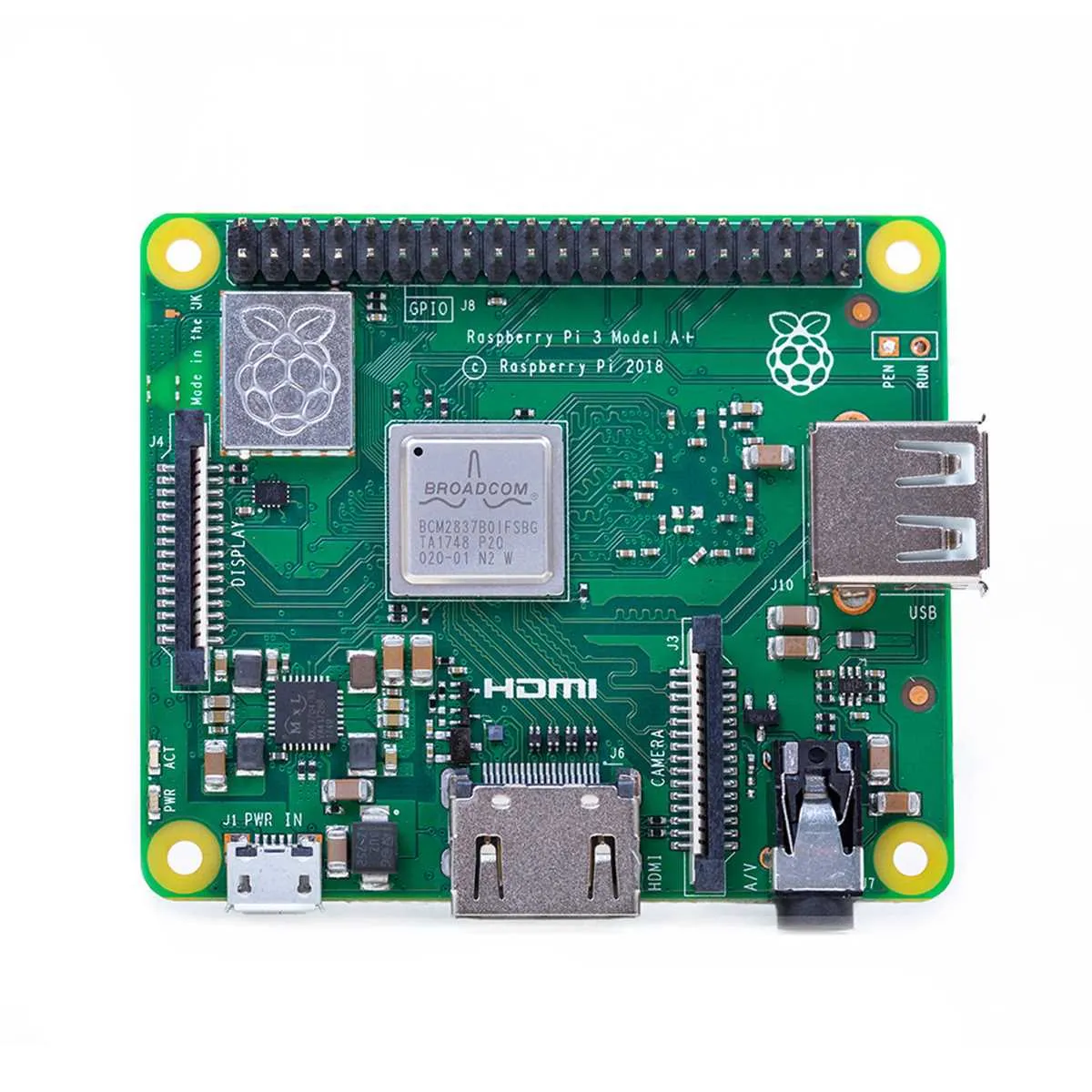
Connect external devices like LEDs, motors, or sensors directly to the GPIO pins of the Raspberry Pi 3 Model B for easy interaction. Begin by identifying the correct GPIO pinout for your setup, as each pin serves a specific function. Refer to the Raspberry Pi pinout diagram to avoid pin conflicts.
Start by wiring your device to the appropriate GPIO pin. For example, to control an LED, connect the anode (long leg) to a chosen GPIO pin and the cathode (short leg) to a ground (GND) pin. Ensure proper resistor usage to prevent damaging the components. A 220Ω resistor is typical for LEDs.
Next, use the GPIO library to control the pins. Install the RPi.GPIO library on your Raspberry Pi and import it into your Python script. Set the pin as an output using the `GPIO.setup()` method and turn the pin on/off using `GPIO.output()` for LED control or similar methods for other devices.
For motors, you might need additional components like a transistor or relay to handle the higher current requirements. Connect the GPIO pin to the transistor base and use the emitter and collector to control the motor circuit.
Test the setup by running a simple Python script to toggle the GPIO pin states. If necessary, use an external power supply for devices that require more voltage or current than the Raspberry Pi can provide.
Use GPIO pins for sensor data input as well, such as reading temperature or humidity values. Configure the pins as inputs and use the `GPIO.input()` method to read sensor states. Consider using the I2C or SPI interfaces for more complex devices.
Maximizing RAM Usage for Performance in Projects
To optimize RAM usage in your Raspberry Pi 3 Model B projects, focus on reducing memory footprint and managing resource allocation effectively. Start by choosing lightweight operating systems like Raspbian Lite, which uses less memory compared to the full desktop version. Avoid running unnecessary background processes to free up resources for critical tasks.
Consider using swap memory when working with memory-heavy applications. However, keep in mind that swapping can slow down performance, so configure it with caution. Set an appropriate swappiness value to balance between speed and memory management. The default swappiness of 60 may be too high for your needs; reducing it to 10-20 can help improve performance.
Minimize the use of GUI-based applications when possible. Instead, rely on terminal-based tools for system management, which consume far less memory. Optimize code by using efficient algorithms and data structures that reduce memory usage, especially when working with large datasets.
Use memory profiling tools like ‘htop’ or ‘free’ to monitor real-time memory usage. These tools help you identify processes that consume excessive memory, allowing you to take corrective action. If your project requires complex computations, consider offloading them to a more powerful machine or a cloud service to save local resources.
For projects involving external devices, minimize memory usage by configuring the GPIO pins and sensors properly. Using efficient libraries like WiringPi or pigpio will help reduce unnecessary memory overhead. Be cautious with GPIO pin configurations to avoid conflicts that could lead to excessive memory consumption.
Choosing the Right Power Supply for Stable Operation
For the Raspberry Pi 3 Model B, ensuring a stable power supply is critical for smooth performance. Use a 5V 2.5A power adapter to avoid undervoltage issues. Insufficient power can lead to system crashes, overheating, and unpredictable behavior.
Here are key factors to consider when selecting the power supply:
- Voltage: The Raspberry Pi requires 5V, and deviations can cause instability. Always opt for a power supply that provides a consistent 5V output.
- Current: Aim for at least 2.5A, especially if using peripherals like external hard drives, USB devices, or displays. If you have multiple peripherals, a higher current rating (up to 3A) is recommended.
- Quality of the Cable: Use a high-quality micro-USB cable with thick wires. Thin cables can cause voltage drops, leading to unreliable operation.
- Certification: Choose a power supply with certifications such as UL or CE to ensure safety and quality.
Using a dedicated Raspberry Pi power supply ensures stable operation, preventing unexpected shutdowns and potential damage to the device.